Buy · 02
Buy what the stock says to buy.
Ask suppliers for prices, raise the purchase order, receive it in part, enter the bill and pay it. What is on order, what has arrived and what is owed to whom is known the whole way.
Start your free 30-day trialHow setting up works
On every plan CoreGrowthScale Growth adds stock ahead and suggested orders. Scale adds approval of large orders. Pricing
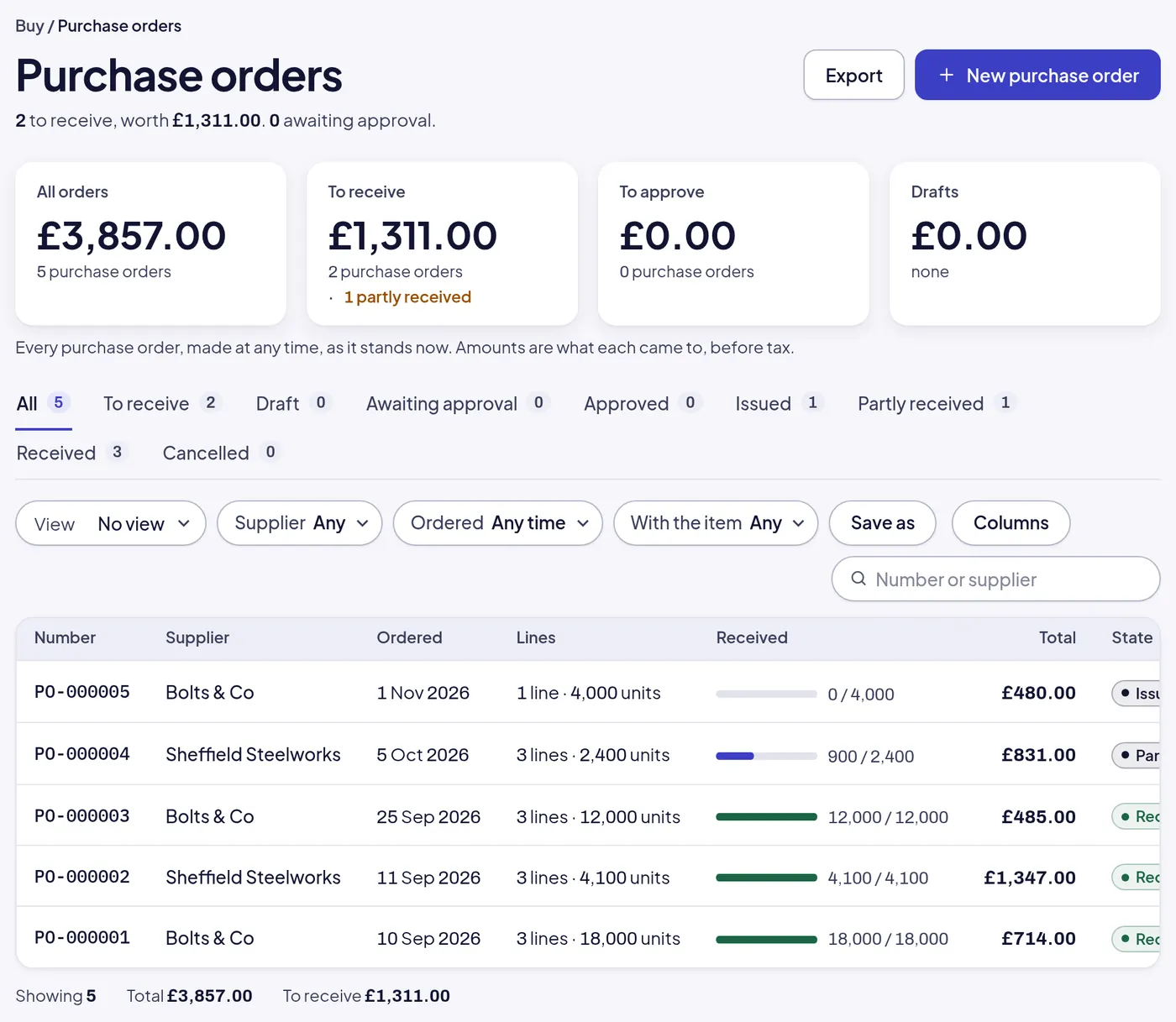
One purchase
From a request for prices to the bill paid.
Every purchase order shows how much of it has arrived, every bill shows when it is due, and the supplier’s page shows what you owe them in all.
- RFQ-000002
Request for prices
Send the same list of items to several suppliers, record what each quotes, and raise the order from the one you choose.
- PO-000004
Purchase order
Issued to the supplier with its lines and prices. Large ones wait for approval on Scale. The stock on order shows on every item.
Adds to stock on order
- REC-000006
Goods received
Receive all of it or part, against the delivery note. The items land on the shelf at what they cost, the rest stays on order.
Posts stock in
- BILL-000004
Supplier bill
Entered against the order with VAT at the standard rate, due on the supplier’s terms. Due in days shows before it is late.
Posts purchases and VAT
- SPAY-000003
Supplier payment
Paid in full or in part. What is still owed to each supplier, and when, is on Today and on the cash forecast.
Posts from the bank
The buying desk, without the spreadsheet.
Reorder points say what is running low, the order says what is coming, and the bill says what it cost.
- Requests
Requests for prices
One list of items to several suppliers, their quoted prices side by side, and the purchase order made from the winner.
- Orders
Purchase orders in part
Issue an order, receive it over several deliveries, and see on each line what is still to come.
- Reorder
Reorder points
Each item carries a reorder point and a target stock. Today lists what is at or below it, with a purchase order one press away.
- Ahead
Stock ahead and suggested orders Growth
What each item will have on hand by date, counting orders in and out, and the purchase orders that would keep it above the line.
- Bills
Supplier bills with VAT
Entered against the order, VAT at the item’s rate, due on the supplier’s terms. Bills due in the next seven days are on Today.
- Payments
Supplier payments
Pay one bill or several at once, in full or in part. The bank in the books and the cash forecast move with it.
- Approval
Approval of large orders Scale
Orders over an amount you set wait for an owner’s approval before they are issued.
- Suppliers
Suppliers with their history
Every order, receipt, bill and payment on the supplier’s page, with contacts, terms and what you owe them.
- Costing
Cost at what it cost
Each receipt lands stock at the price on the order, first in, first out, so the value of the stock and the margin on each sale are real.
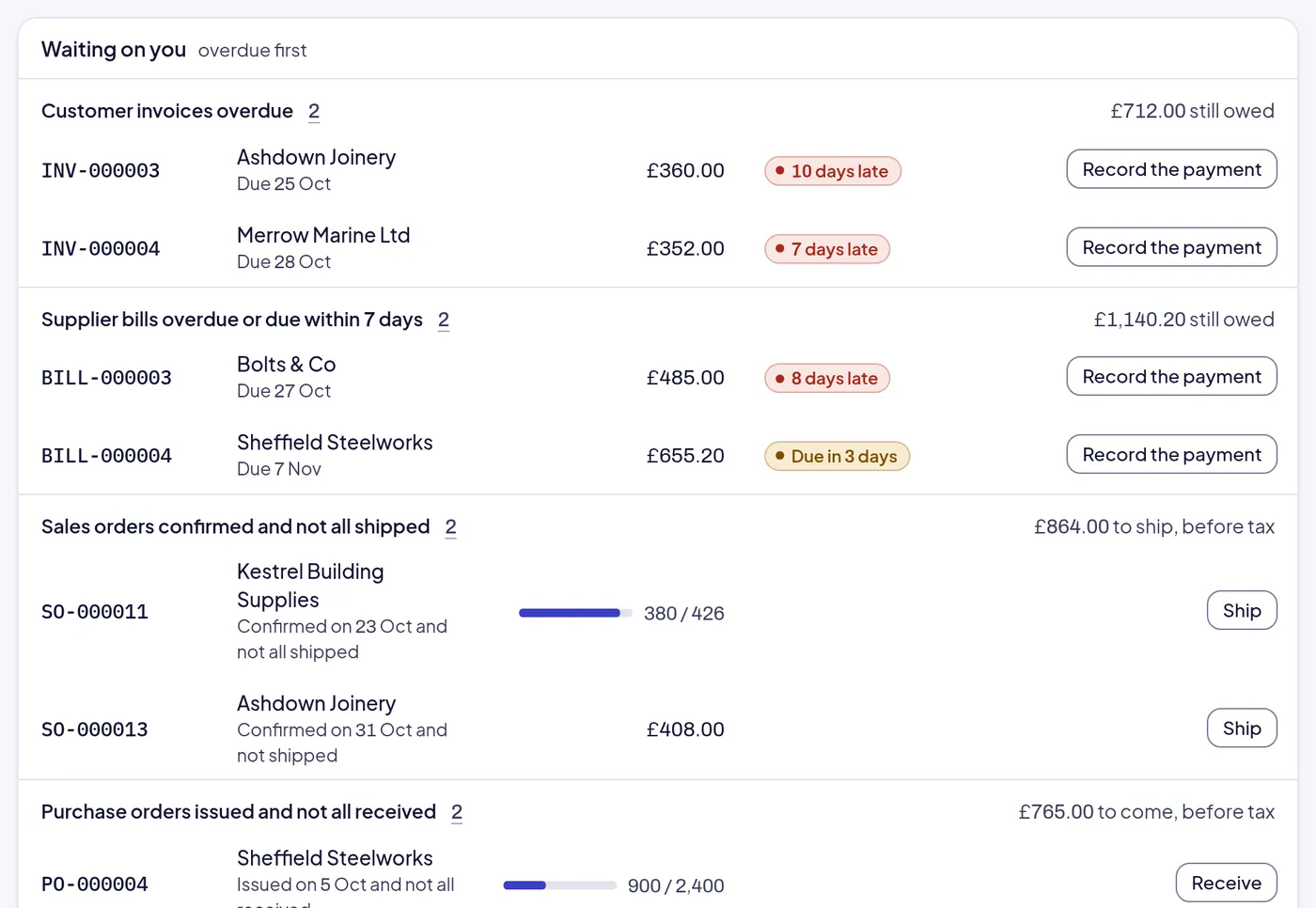
On Today
What is due to pay, before it is late.
Supplier bills overdue or due within seven days sit on Today with the customer invoices, the orders to ship and the orders to receive, overdue first, each with its button.
Where it leads.
Buying feeds the shelf and the books. Receive a delivery and the stock is there; enter the bill and the books and the cash forecast know.
- 03 Stock
Received goods land on the shelf
Each receipt puts the items on hand at what they cost, and takes them off what is on order.
- 05 Books
Bills and payments post themselves
A bill posts purchases and VAT when it is entered; a payment posts from the bank when it is made.
- 06 Reports and Today
The purchasing dashboard
What was bought by month, from which suppliers and of which items, against the period before.
Not built yet
- Landed costs: freight and duty spread over a delivery
- Supplier portals or electronic orders
- Blanket orders drawn down over a year
A purchase order is priced at what the supplier quoted; what it costs to get it to you is a bill of its own.
Start here
Raise a purchase order in the sample company.
Three items are at their reorder point in the sample company right now. Open it, raise the order, and receive it, before you set up your own.
Start your free 30-day trial or WhatsApp us
- Emailhello@opsmavix.comAnswered the next working day
- Phone+44 7533 464865On Scale, or to ask before you start
- WhatsAppMessage usThe quickest way to a person