CRM · 04
Leads to deals to orders.
Who to call back, what each deal is worth and when it will close, for everyone who sells. A quote made from the deal wins it when accepted, and the order follows on the same customer.
Start your free 30-day trialHow setting up works
Leads, deals, the pipeline and the CRM report come with Growth Pricing
One customer
From a name to a paid order.
A lead is qualified into a deal, the deal moves through the stages, the quote is made from it, and the accepted quote wins the deal and makes the order.
- LEAD
Lead
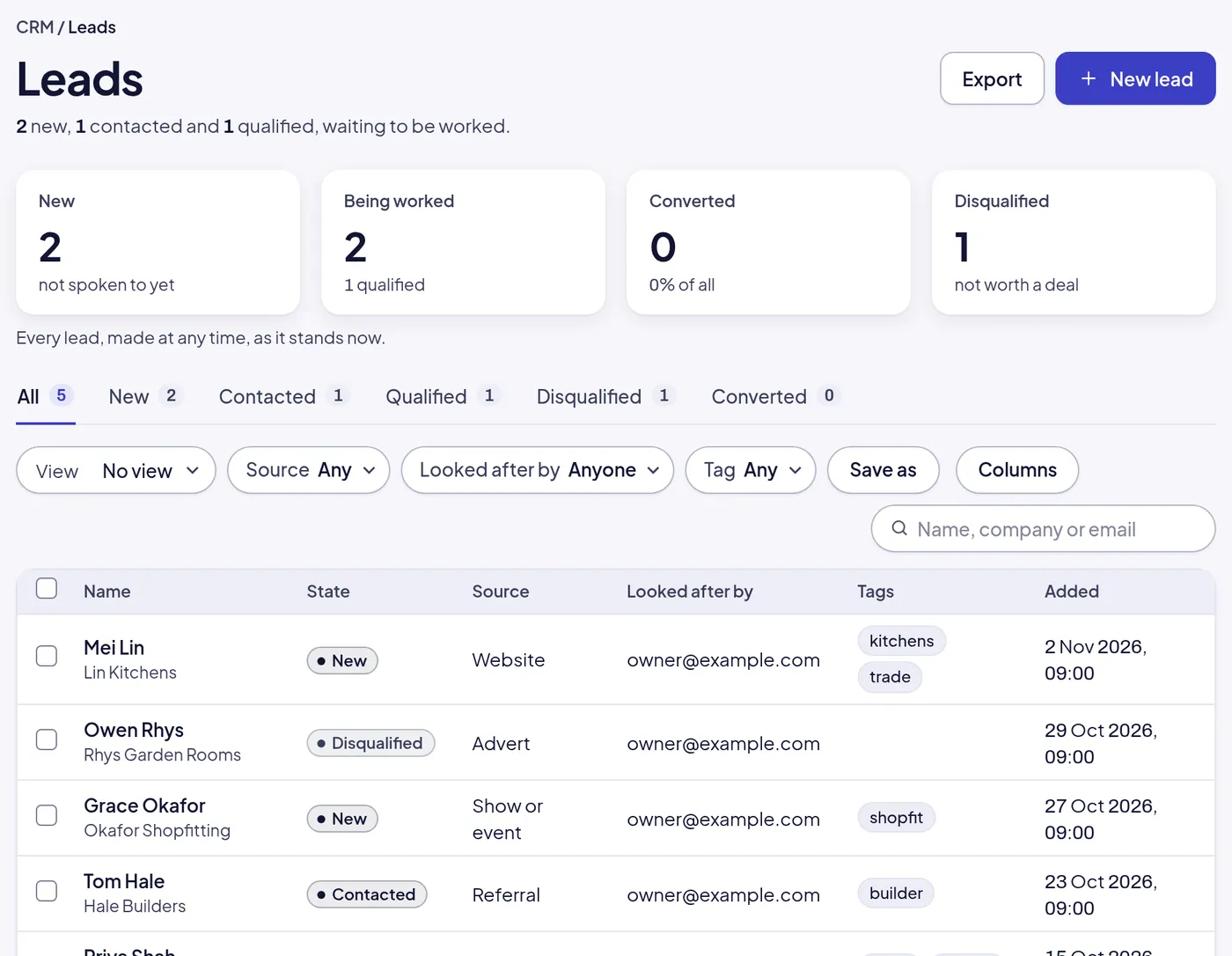
A name, a company and where they came from: website, advert, referral, a show. Tagged, and looked after by someone.
- DEAL
Deal
Qualified into a deal with a value, a close date and a stage. The customer is made the moment the deal is.
- PIPELINE
Pipeline
Stages you name, each with its likelihood, so the pipeline is worth what it is weighted to be, not what it says on paper.
- QUO-000003
Quote from the deal
The quote is made from the deal with its customer already on it. Accepted, the deal is won; declined, it is lost, with the reason.
- SO-000011
The order
Won deals become orders on the same customer, whose page carries the deal, the quote, the order and every call along the way.
What a sales team needs, and nothing it does not.
Not a CRM on the side with its own idea of who your customers are. The same customers, the same quotes, the same orders.
- Leads
Leads from every source
Website, advert, referral, show or event, each with its tags and who looks after it. Qualify or disqualify with a reason.
- Deals
Deals with value and date
What it is worth, when it should close, which stage it is at. Lost deals keep why, so you learn from them.
- Pipeline
A pipeline you shape
Name the stages and give each its likelihood. See the pipeline as a board or a list, weighted or not.
- Activities
Calls, meetings, emails, tasks
Logged on the lead, the deal or the customer, with what was said and what comes next.
- My work
My work
Each person’s own calls to make, tasks due and deals to move, in one place, today first.
- Timeline
The customer’s timeline
Every call, quote, order, invoice and payment on one customer, in order, so anyone can pick up the thread.
- Report
The CRM report
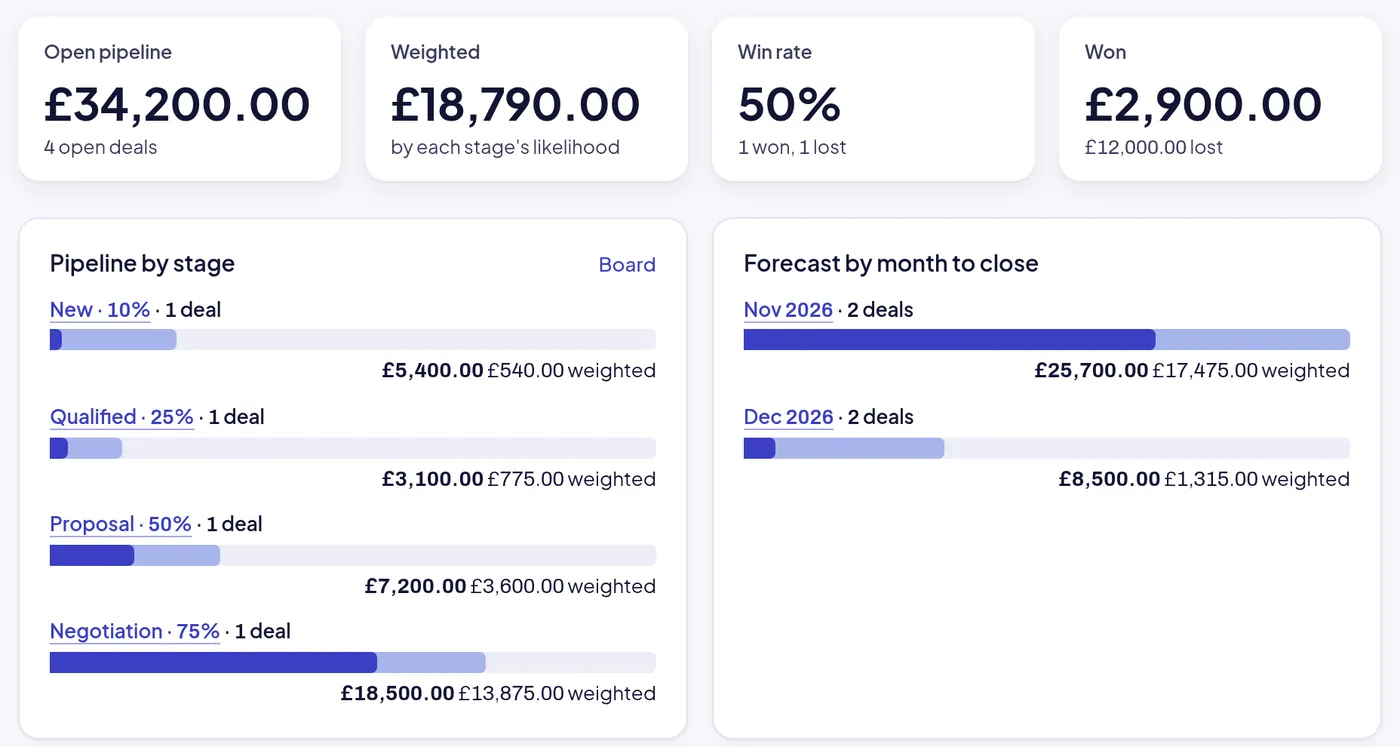
Open pipeline, weighted pipeline, win rate, what was won and lost, the pipeline by stage and the forecast by month to close.
- Fields
Fields of your own
Add the fields your sales process needs on leads, deals and customers, and filter and report by them.
- Mentions
Mentions and assignment
Assign a lead or a task to someone; they hear of it in the bell, with what is theirs and what is due.
The CRM report
A forecast worth what it is weighted to be.
Four open deals read as £34,200 on paper and £18,790 weighted by stage. The forecast by month says which of it lands when, and the win rate says how often it does.
Where it leads.
The CRM is the front of the same system the orders and the books live in, so a won deal does not have to be typed again anywhere.
- 01 Sales
The quote comes from the deal
Made with the customer already on it; accepted, it wins the deal and makes the order.
- 06 Reports and Today
Sales by customer
What each customer has bought, by month, next to what their open deals are worth.
- 05 Books
What they owe, on the same page
The customer’s invoices, how late, and their statement, beside the deals you are working.
Not built yet
- Email sent and received inside the system
- Marketing lists and campaigns
- A customer portal
Emails are logged as activities; sending a quote or an invoice goes out from the system with its PDF.
Start here
Work the pipeline in the sample company.
Five leads, four open deals and a quote waiting for an answer are in the sample company now. Move a deal, make its quote, and watch the order follow.
Start your free 30-day trial or WhatsApp us
- Emailhello@opsmavix.comAnswered the next working day
- Phone+44 7533 464865On Scale, or to ask before you start
- WhatsAppMessage usThe quickest way to a person